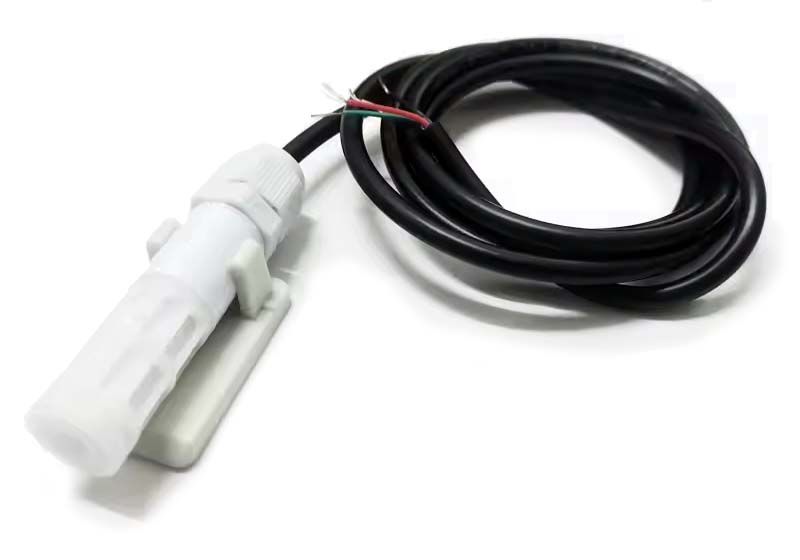
SHT30 Temperature/Humidity Sensor

SHT30 Temperature Sensor

The SHT30 sensor is available with options that include either an I2C or RS485 interface. The present exercise, however, is part of developing a broader understanding of the characteristics of RS485 communications, although it will also provide a direct comparison between the general requirements for and operation of these two connectivity options.

The basic operational details were provided on the AliExpress product page.

To date, I have referred to manuals for similar sensors, this one and this one, retrieved from the ComWinTop website, as a guide in forumlating the necessary Modbus RTU queries.

Testing Notes
  • The sensor specifications indicate that it will operate with a supply voltage of 5~30V although some documentation suggests that the sensor itself operates on a voltage of 2.4~5V. In the event, it responded to Modbus RTU queries reliably and reported plausible ambient temperature readings on a 5V supply from the [USB powered] CubeCell Plus.
  • Supplied with a default baud rate setting of 9600.
  • Responds to a Modbus RTU broadcast address of 0x00.
  • As supplied, when queried this sensor reports a Slave ID of 0x00, even though all of its responses show a source Address of 0x01. It does, however, respond to queries directed to a Slave ID of 0x01—it also responds to queries directed to a Slave ID of 0x00, but this, of course, is also the address it would recognise as the broadcast address. Regardless, I was unable to change the Slave ID. The sensor would respond to the query, but simply report that its Slave ID was 0x00, rather than reflecting the requested change. It may be that I am doing something wrong here, but I am following the same process that I used to successfully change the Slave ID of the Soil Condition sensor.
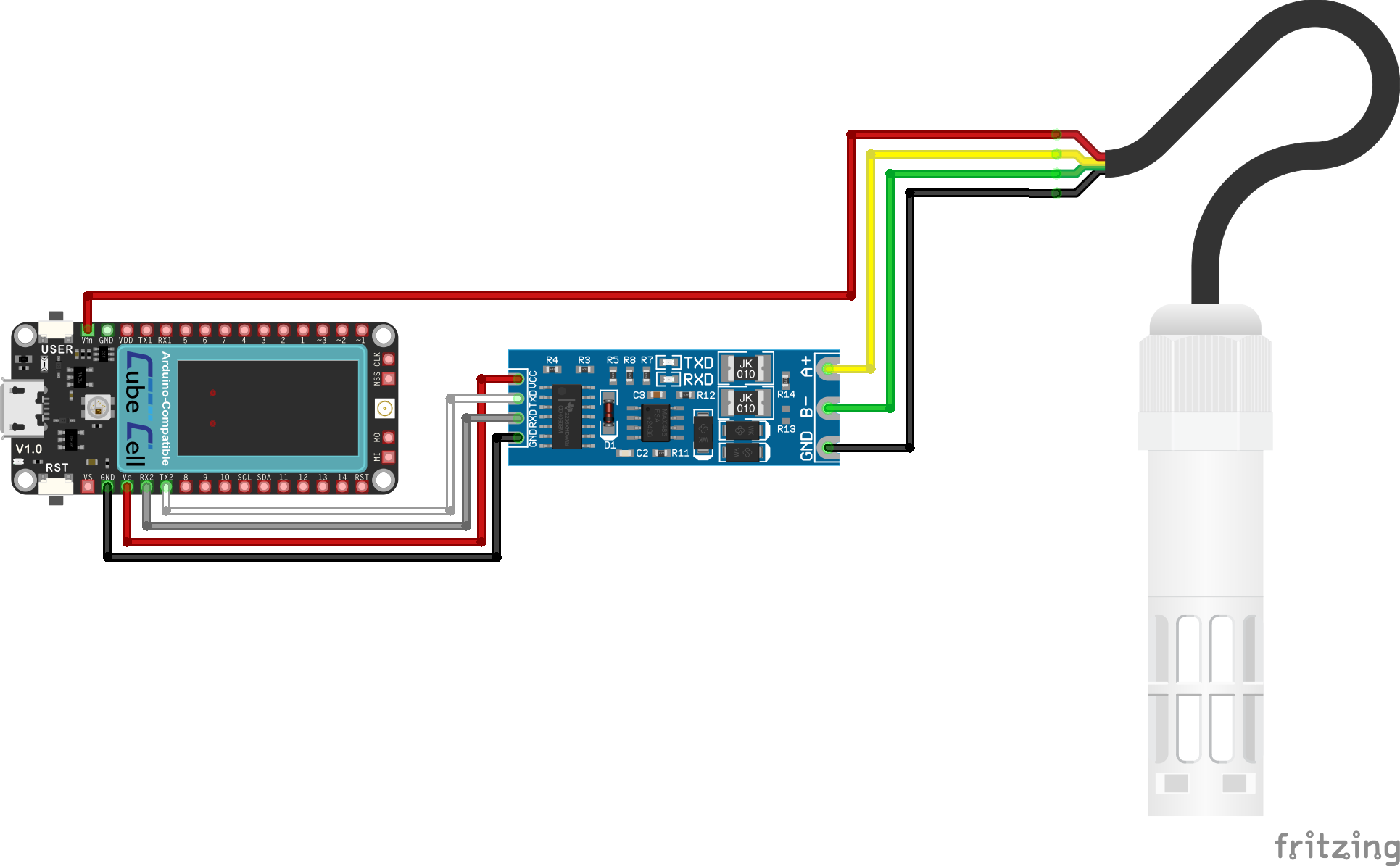
CubeCell Plus RS485 SHT30 Sensor Hardware Configuration

SHT30 Sensor [RS485] Configuration Circuit
Pin Configuration
CubeCell Plus UART-to-RS485 SHT30
GND GND
UART_TX2 Tx
UART_RX2 Rx
Vext Vcc
Vin Red
A+ Yellow
B- Green
Sig-GND Black

Note that the colours of the RS485 wires on various probes that I have tested have all been different so it is important to verify which wire is which on any given probe and not rely on any idea of standardised colouring of wires.

Software


RS485 SHT30 Sensor Test Sketch
#include <softSerial.h>

/*
   A simple sketch to test RS485 communications with SHT30 temperature & humidity sensor.
   It uses SoftwareSerial, and assumes that we have a TTL-to-RS485 adaptor connected
   to the second CubeCell Dev-Board Plus UART (UART_TX2/UART_RX2) and the SHT30 sensor.
*/

#define RS485BaudRate 9600

int counter = 0;
String receiveString, sendString;

// SHT30 Temperature & Humidity
byte queryData[]{ 0x01, 0x03, 0x00, 0x00, 0x00, 0x02, 0xC4, 0x0B }; // Master read SHT30 temperature humidity
//byte queryData[]{ 0x01, 0x03, 0x07, 0xD0, 0x00, 0x01, 0x84, 0x87 }; // Enquire Slave ID
//byte queryData[]{ 0x00, 0x03, 0x07, 0xD0, 0x00, 0x01, 0x85, 0x56 }; // Enquire Slave ID (Reports Slave ID 0)
//byte queryData[]{ 0x01, 0x06, 0x07, 0xD0, 0x00, 0x02, 0x08, 0x86 }; // Set Slave ID to 2 (doesn't seem to have any effect)
//byte queryData[]{ 0x01, 0x03, 0x07, 0xD1, 0x00, 0x01, 0xD5, 0x47 }; // Enquire Baud

byte receivedData[19];
// Define the serial entity for connection to the RS485 adaptor
softSerial RS485(UART_TX2, UART_RX2);

void setup() {

  // Supply power to the RS485 adaptor

  pinMode(Vext, OUTPUT);
  digitalWrite(Vext, LOW);
 
  // Open the serial ports

  Serial.begin(115200);
  RS485.begin(RS485BaudRate);

  Serial.println("[setup] CubeCell Plus RS485 SHT30 Temperature Sensor Test");
}

void loop() {
  // Send the query...
  Serial.println("[loop] Sending query...");
  RS485.write(queryData, sizeof(queryData));
  delay(500);
  // If we've received anything...
  if ( RS485.available() > 0 ) {
    // Report anything we receive on the RS485 bus
    RS485.readBytes(receivedData, sizeof(receivedData));
    Serial.print("[loop] Received Data : ");
    for ( int i = 0; i <= sizeof(receivedData); i++ ) {
      Serial.print("0x");

      Serial.print(receivedData[i],HEX);
      if ( i < sizeof(receivedData) ) {
        Serial.print(", ");
      }
    }
    Serial.println("\n");
        // Parse and print the received data in decimal format
    unsigned int soilHumidity = (receivedData[3] << 8) | receivedData[4];
    unsigned int soilTemperature = (receivedData[5] << 8) | receivedData[6];

    Serial.print("Soil Humidity: ");
    Serial.print((float)soilHumidity / 10.0);
    Serial.println("%");
    Serial.print("Soil Temperature: ");
    Serial.print((float)soilTemperature / 10.0);
    Serial.println("°C");
    Serial.println();

  } else {
    Serial.println("[loop] No response...");
  }
  delay(5000);
}

Further details pending

03-09-2026